Unlimited Bowling
- 4.4
- Rating
- 100.00K
- Installs
- Free
- Price

 Analysis by App-foxy
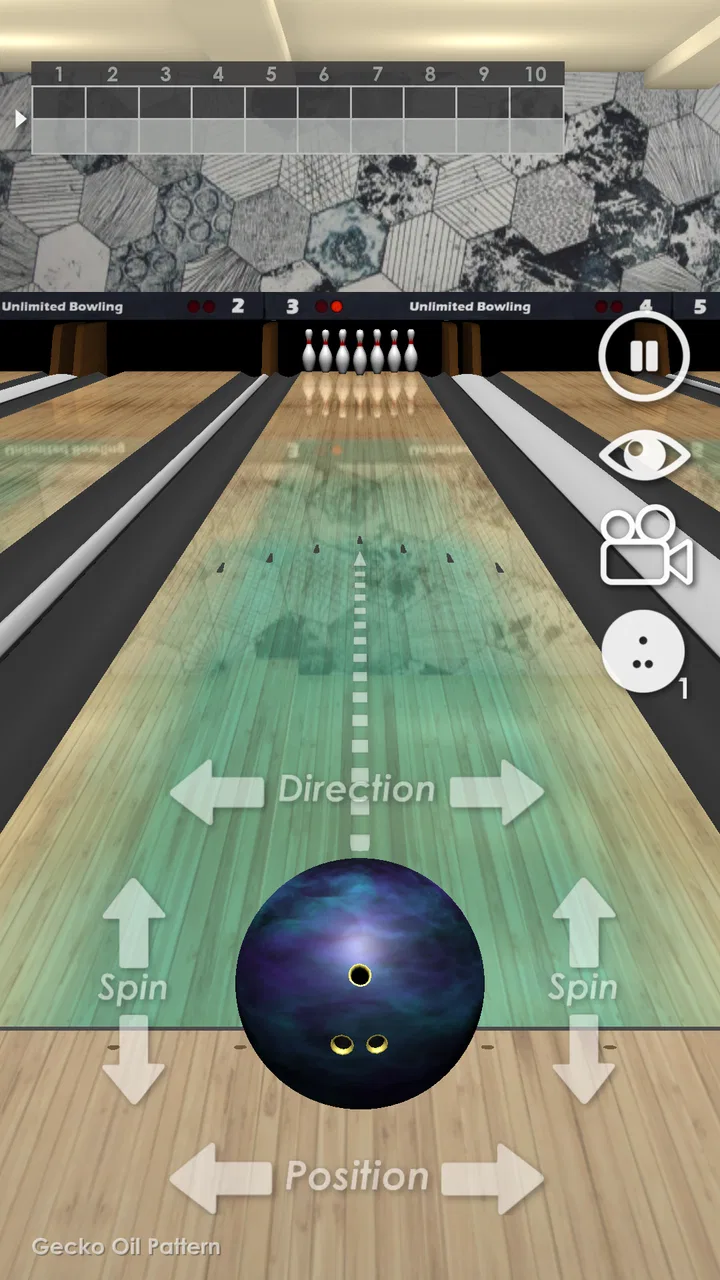
I approached Unlimited Bowling as a quick sports game rather than a full bowling simulator, and that distinction matters. It is designed to give you the basic pleasure of lining up a shot, sending the ball down the lane, and seeing whether your aim turns into a satisfying result. That makes it easy to understand, but it also means the experience depends heavily on how comfortable you are with a simple, focused game loop.
In my experience, the appeal is strongest when I want something I can pick up without learning a complicated control system. There is no need to study a long rules section before playing a few turns. The game belongs to the sports category, comes from SP Software Productions, and is free to play, so it is an approachable choice for casual sessions on an Android device.
The store presents it as a bowling experience intended to feel close to real life. I would describe it more carefully: it captures the familiar rhythm of bowling without trying to replace a detailed console or PC simulation. If you enjoy short attempts, small improvements in aim, and the simple tension before the pins fall, it has a clear purpose. If you expect deep career management, realistic league administration, or extensive customization, you should adjust your expectations before installing it.
You May Also Like

 Blood Strike: 2.5 Anniversary
Blood Strike’s Loadouts Turn Every Drop Into a Tactical Gamble
A close look at Blood Strike’s custom loadouts: how fast access to signature weapons reshapes its battle royale rhythm, rewards preparation, and narrows the gap between fights.

 Pandora - Music & Podcasts
Pandora’s Music Is Easy to Start, but Harder to Recover
Pandora’s strength is its low-effort path from a seed to a station. Its weak spot is how much confidence it asks you to place in connection, setup, and quiet recovery.

 8 Ball Pool
 Is Built on Rivalries, Rematches, and Routine
A close look at the rivalries, rematches, shared routines, and unanswered safety questions that turn a quick pool match into a persistent mobile community.

 Samsung Music
’s Quiet Strength Is Playing What You Already Own
Its reach comes less from spectacle than from dependable access to a personal library. That simplicity is both the app’s strongest retention engine and its ceiling.

 AccuWeather: Weather Radar
AccuWeather Review: A Quick, Clear Forecast for Everyday Decisions
For everyday plans, the best forecast is the one you can understand quickly. AccuWeather makes rain timing, radar, and local conditions easy to act on, with a few trade-offs.

 Hill Climb Racing
Why Hill Climb Racing Still Turns Crashes Into One More Run
A tiny car, a bumpy hill and one more upgrade: Hill Climb Racing keeps resurfacing because its simple chaos makes every near-miss feel personal.
More From Our News Desk



Getting past the first points of friction
The first place many players get stuck is not necessarily the bowling itself. It is the transition from opening the game to understanding what the screen expects from them. A bowling game can look obvious, yet small differences in how you aim, release, or confirm a shot can make the first few attempts feel less natural than expected.
I recommend taking the first session slowly instead of immediately trying to play for a perfect score. Watch what changes when you move your aim, and notice whether the game responds to a tap, a swipe, or another gesture. The useful habit is to change only one part of your motion at a time. If you alter direction, speed, and release together, you will not know which adjustment helped.
That approach is especially valuable on a phone, where a finger can cover part of the lane and make precise positioning harder. Hold the device in a comfortable position, keep your hand relaxed, and avoid making a rushed gesture simply because the shot timer or visual presentation feels quick. A calm release is easier to repeat than a dramatic one.
The most important early lesson is consistency, not power. New players often chase a forceful shot after a poor result, but a repeatable line gives you more useful information. Once you understand how the ball reacts, you can start experimenting with stronger or more angled attempts.
What to check before blaming the controls
If a shot seems to go in a different direction from the one you intended, first check your own starting position. A finger beginning slightly off-center can create a larger error than expected, particularly when the screen is small or your grip changes between attempts. I found it more helpful to use the same hand position for several throws than to keep switching between portrait and landscape-style handling.
Screen cleanliness also matters more than people expect in a gesture-based sports game. A smudge can make a swipe feel uneven, while a thick case edge may interfere with how far your finger travels. These are simple checks, but they can prevent you from treating ordinary touch friction as a problem with the game.
Another practical check is the device itself. The game supports Android devices running version 7.0 or later, and it is marked suitable for Everyone. That broad compatibility makes it easy to try on older hardware, but an older phone may still have its own performance limits. If the game feels delayed, close other demanding apps, restart the device, and try again before changing your playing technique.
Because it is free, the initial decision is relatively low-risk. Still, free does not mean every device will deliver the same feel. A phone with a responsive touchscreen and stable performance will usually make aiming more comfortable than an aging device with inconsistent touch input. When possible, test the controls in a quiet setting before deciding that the game is too difficult.
A simple setup routine that saves time
My preferred setup routine is straightforward. I first make sure the game is updated to its current version, 1.18.3, then close apps that may compete for memory or attention. I check that the phone has enough battery for a comfortable session, turn off anything likely to interrupt a throw, and place the device on a stable surface or hold it with both hands.
These steps do not change the bowling mechanics, but they reduce avoidable interruptions. A notification appearing during a shot, a sudden change in grip, or a brief slowdown can make a player misread the result. If you are testing whether the game suits you, it is better to evaluate it under steady conditions rather than during a distracted first attempt.
I also suggest playing several ordinary shots before judging the difficulty. One unlucky throw tells you very little. A short sequence lets you separate a genuine control issue from normal variation in your aim. This is one of the most useful ways to avoid uninstalling too quickly after a confusing opening minute.
Recovering when a session goes wrong
When the game stops responding as expected, the best recovery method is usually gradual. Start by waiting briefly rather than tapping repeatedly. Repeated taps can make it harder to tell whether the game has paused, whether a command was registered late, or whether the screen simply needs a moment to catch up.
If the screen remains unresponsive, leave the session and reopen the game. A full device restart is a reasonable next step if the same behavior appears again. I would not begin by changing several phone settings at once, because that makes the result difficult to understand. One change at a time is slower, but it gives you a clearer answer.
For control problems, repeat the same test after reopening: use the same hand, the same grip, and a similar gesture. If the response improves, the earlier issue may have been temporary. If it does not, test the touchscreen in another app. This comparison is more useful than endlessly repeating the same bowling throw.
There is also a difference between a lost attempt and a broken game. A poor shot, an unexpected split, or a frame that does not go as planned is part of the sport. Before restarting, consider whether the result is actually a malfunction. Bowling rewards patience, and restarting after every disappointing throw can prevent you from learning the game’s behavior.
How to build a repeatable bowling workflow
I get better results by treating each throw as a small experiment. I choose a target line, make one controlled motion, and then remember what happened. If the ball moved too far to one side, I make a modest correction on the next attempt instead of swinging completely across the lane. This workflow is more effective than trying to force a strike through increasingly wild gestures.
A useful everyday scenario is a short break between tasks. I can open the game, play for a few minutes, and stop without needing to prepare a long campaign or remember a complex set of objectives. That makes it suitable for casual players who want a sports-themed distraction, especially when they prefer direct action over menus and management.
It can also work as a low-pressure game for families because the age classification is Everyone. I would still recommend that younger players learn the controls with an adult nearby, not because the game is difficult to understand, but because shared play makes it easier to explain aiming and patience. The simple format is more inviting when someone helps turn early misses into a learning process.
For personal improvement, focus on repeatability rather than a single impressive result. Use a similar starting position, keep your movement smooth, and make only small changes after each throw. This turns the game from random tapping into a basic practice routine. It is a subtle strength: the limited scope leaves room for players to create their own challenge through better control.
At the same time, that self-directed structure can become a limitation. Players who need unlockable goals, detailed progression, or a strong sense of long-term development may run out of reasons to continue sooner than expected. The game is better at delivering a compact bowling activity than at building a large sports career around it.
When the phone, not the game, is responsible
It is easy to blame a bowling game when a throw feels inaccurate, but touchscreens introduce several outside variables. A device with a damaged or inconsistent display can register a gesture differently from one area to another. A protective film may also change the feel of a swipe. Testing another game or a drawing app can help reveal whether the problem is broader than this title.
Performance issues can have a similar cause. If the phone is hot, low on available storage, or busy with background tasks, the game may feel less responsive. Closing unused applications and giving the device a moment to cool down are sensible first steps. I would avoid promising that these actions solve every problem, but they are safe checks before assuming the game itself is at fault.
Network conditions are another area where players sometimes look for a complicated explanation. A simple bowling session should not be judged only by a temporary interruption elsewhere on the phone. If other apps are also slow or failing, investigate the device or connection environment first. If everything else works normally and only this game behaves badly, reopening it and checking for the latest version is the more focused response.
Storage is worth checking before an update. A game may appear installed correctly while the phone has very little room left for system tasks. Freeing a modest amount of space, restarting, and trying again is more practical than repeatedly pressing the update control. These are general maintenance steps, but they are particularly useful when evaluating an older-compatible game on a phone that has been in service for several years.
There is also a human cause: fatigue. Bowling controls that feel precise during a quiet session can feel awkward when you are distracted or trying to play one-handed while walking. I would not use that situation to judge the game. Sit down, use both hands if that feels more stable, and play a few throws under normal conditions.
Who will enjoy it, and who should choose something else
I think this game suits people who want a free, uncomplicated sports experience. It is a reasonable pick for a quick break, a casual challenge with friends or family, or anyone who likes the familiar anticipation of a bowling shot without committing to a large simulation. Its broad age rating and modest entry barrier make it easy to recommend to newcomers.
It is less suitable for players who want bowling to behave like a serious competitive simulator. If your priority is detailed physics, extensive training tools, online competition, advanced statistics, or a deep season structure, a more specialized bowling title may be a better fit. The usual alternative in this category is a larger simulation that offers more systems and presentation, but often asks the player to spend more time learning menus and progression. This game trades that depth for immediacy.
It may also disappoint players who need constant novelty. A focused bowling loop can be relaxing, yet repetition becomes noticeable if you expect frequent new modes or a broad collection of activities. I would choose it for short, repeatable sessions rather than as my only sports game.
The audience size suggests that it has found a substantial group of interested players: it has passed one hundred thousand installs, with an average rating of 4.4 from around 4.8 thousand ratings and roughly 1.8 thousand written reviews. Those figures do not replace personal testing, but they do show that the straightforward concept has attracted sustained attention rather than being an obscure experiment.
My practical verdict after using it
Unlimited Bowling works best when you treat it honestly. It is a free sports game built around the immediate pleasure of making bowling shots, not a complete replacement for a dedicated bowling simulator. I like that it does not require a large commitment to understand, and I appreciate how a few careful adjustments can make the control feel more deliberate than the first attempts suggest.
My main advice is to give the setup a fair chance. Use a clean screen, hold the phone steadily, test the same gesture several times, and distinguish a bad throw from a technical failure. If the game misbehaves, reopen it, check the device, and compare the touchscreen with another app before deciding where the problem lies. Those small habits make the experience more predictable.
The developer, SP Software Productions, has kept the idea accessible enough for a wide audience, and the Android 7.0 minimum makes it available to many older devices. Its release on February 15, 2018, also places it among the more established options for players looking for a simple bowling game rather than a newly launched experiment.
After a session, my recommendation is fairly clear. Install it if you want a lightweight bowling activity that is free, easy to start, and capable of rewarding patient aim. Skip it if you need a deep sports package, rich long-term progression, or the level of control offered by a serious simulation. For the right player, Unlimited Bowling is at its best as a quick, repeatable game where improving one small part of a shot is enough to make the next session worthwhile.
FAQs for Unlimited Bowling
01What platforms is Unlimited Bowling available on?
Unlimited Bowling is available for both Android and iOS devices. You can download it from the Google Play Store for Android or the Apple App Store for iOS. Ensure your device meets the minimum system requirements for optimal gameplay experience.
02Are there in-app purchases in Unlimited Bowling?
Yes, Unlimited Bowling offers in-app purchases. These can include extra features, customization options, and boosts. While the game can be enjoyed without spending money, some items or enhancements may require a purchase to unlock. Always check the app settings to manage purchase preferences.
03Does Unlimited Bowling require an internet connection?
Unlimited Bowling can be played offline, allowing you to enjoy the game without an internet connection. However, certain features like leaderboards, multiplayer modes, or special events might require an active internet connection to function properly.
04What are the main features of Unlimited Bowling?
Unlimited Bowling boasts realistic physics, multiple game modes, and a variety of bowling alleys and balls. Players can customize their bowling experience and challenge themselves with different difficulty levels. The game also supports multiplayer, allowing you to compete against friends or players worldwide.
05Is Unlimited Bowling suitable for all ages?
Unlimited Bowling is designed to be family-friendly and suitable for all ages. The game's intuitive controls and engaging gameplay make it accessible for both kids and adults. However, parental guidance is recommended when it comes to in-app purchases to prevent unintended spending.
Pros
- Realistic physics enhance gameplay experience.
- Wide variety of challenging levels.
- Smooth and intuitive controls.
- Engaging graphics with vibrant colors.
- Multiplayer mode for competitive play.
Cons
- Occasional ads can interrupt gameplay.
- Limited customization options for avatars.
- Requires constant internet connection.
- In-app purchases can be pricey.
- Some levels feel repetitive over time.

Unlimited Bowling
Gallery